

Shorts Frame
Demos
Best Practices
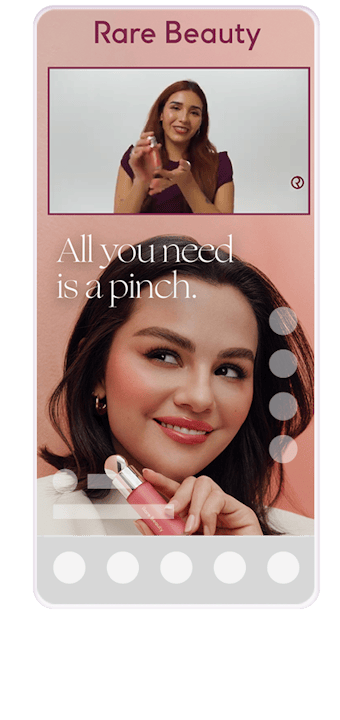
Shorts Frames are perfect for campaigns with horizontal or square video assets. By adding a branded frame around your horizontal creator video content, brands can grab user attention as they scroll through the Shorts feed.
Frame Position
Depending on the design, important information like text, logo and imagery can be added to the space above and/or below the horizontal or square video content. This will allow the key information to always be in view, while not distracting from the video.
Copy & CTA
We suggest using as little text as possible to allow your branding and imagery to shine. Keep copy as close to the following suggestions:
- Headline (100 characters)
- Additional copy (100 characters)
If you would like to include more text than suggested, consider animating to break up the content and allow the user to process smaller pieces of information.
Users are unable to click directly from the video space to a landing page, so there is no need for a CTA button. Call to actions should be included in the headline messaging if necessary.
Design Assets
Video File
.mov or .mp4
Video Length
6, 15 or 30s
Existing Media Files
.psd or .ai
Fonts
.otf or .ttf
Logos
.png, .jpg, .psd or .ai
Images
.png, .jpg, .psd or .tiff
Animation
Storyboard or written concept
Copy
Approved copy only
CTA
Approved CTA only